Ants Miseretto part 12 – Risk Reduction


OK. no more dancing around, time to add the gold legs. I started by engraving the cuts for the legs, first with a Lindsay Universal graver, followed by a Carl Bleile narrow graver, so the cuts are quite deep.  The golden color of the legs is just the raw shibuichi base, no gold inlay yet.


Looking at the center leg (at 6 o’clock), I undercut the engraved groove with the small Ray Cover-style graver like a sharpened flat blade screwdriver.  Just driving it right straight in perpendicular to the axis of each leg segment, with the graver tilted around 45 degrees.  You must be careful not to damage the side nearest to your hand when you do this, so be conscious of the angle.  You can also see the end of the gold wire I’ll use to inlay with.

If you’re wondering about the silver-colored leg, I previously inlaid that in .999 Fine silver, thinking to maybe save a little cost.  I don’t like it, so I’ll remove it and use gold instead.


Here you can see the gold wire in the groove (at 3 o’clock), after hammering it in with a small brass punch in my Lindsay Airgraver.  I followed up with the small steel punch, driving the gold further in, and working off the excess by hammering it into thin leaf.


Above, you can see all three of the right side legs inlaid with gold.  I used a tiny burnisher to further thin the excess gold into leaf, and lightly scraping it away with the burnisher.


So far, I inlaid each leg separately, trying a few different techniques as I went.  Above, I’m working the left side legs as an assembly line, in case there will be problems with the legs being so close.  As it turns out, the assembly line method is the way to go.


And here are all the legs inlaid.  Notice how the gold legs blend in a little with the background.  This will be alleviated somewhat when I patina the pendant, but I need to use another technique to provide a little more definition as well.


Above, I used a really tiny Lindsay Universal graver that I normally use for cutting small shading lines, and have outlined the legs.  I’m trying really hard to cut into the base metal (shibuichi), and not the gold.  Notice the difference in definition between the two sides, remembering that these little outlines are almost invisible to the naked eye!

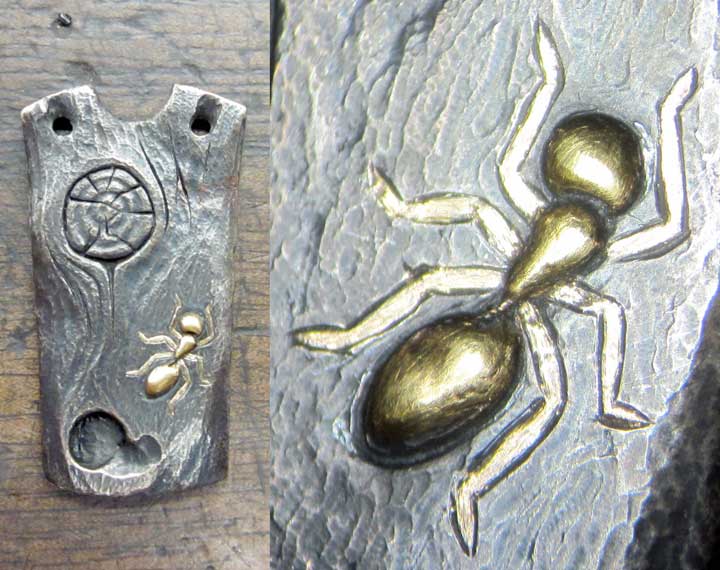
And, finally, the front side of the pendant is finished!  Now to add my signature to the back, texture the silver sides, and assemble it.  I’ll do that tomorrow…

Posted in Carving, Jewelry | Tagged , , , , , , | Leave a comment

Ants Miseretto part 11 – Risk Reduction


Further work on the ant pendant.  I began carving the wood texture and knothole, using carbide burrs, and engraving the thin lines for the knothole.  Above is how the shibuichi looks without the patina.


And a quick patina to see how things are coming along…


More shaping to look like an old branch…


And here it is with a quick patina, ready to add the little gold legs to the carpenter ant tomorrow.

Posted in Carving, Jewelry | Tagged , , , , , | Leave a comment

Ants Miseretto part 10 – Risk Reduction

Now to inlay a gold ant into shibuichi – just to make sure I can do it, and work out any difficulties before risking my miseretto canvas…


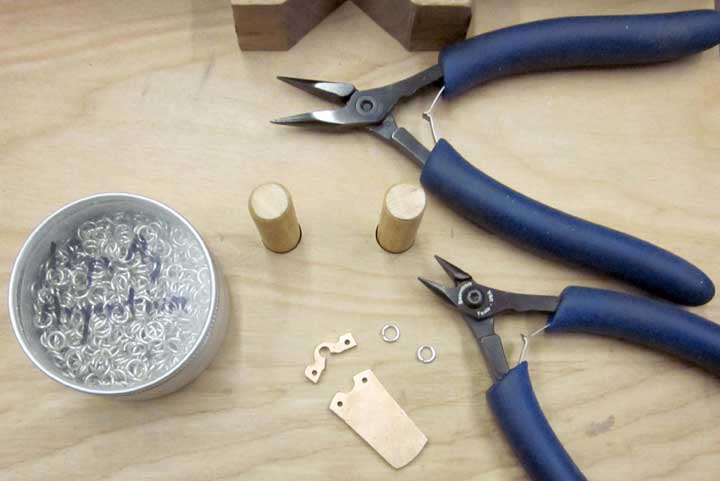
Here I’m test fitting two Argentium™ silver jump rings to the pendant.  I know just from experience that these tiny jump rings aren’t going to work well as the pendant is right now, because of the thickness of the shibuichi/silver sheet.


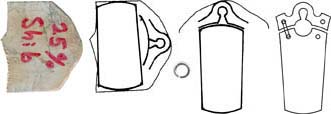
You can see above that the jump rings can’t be closed without distorting them.  This image is a computer composite of the front and back images.  Note the jump ring on the back (silver) side of the image (on the right) – it can’t be closed without jamming the top and bottom parts of the pendant together, and I want them to swing freely.  To address this, I will trim the square edges of the holes, rounding them to make a little more room.


Above, I’m using a Sharpie™ permanent marker to mark where I need to remove metal (front and back sides).


Above, I’ve carved away the top edges of the dangly part of the pendant, and the bottom edges of the holes in the top piece using a small carbide burr.  I’ve done this for both the front and back.  At the top of the image are two cross sectional drawings of the hole, before and after.  On the right, you can see both top and bottom portions of the pendant assembled with jump rings.  The jump rings fit perfectly!


Above, I’ve used a little pitch to stick the lower (dangly) part of the pendant to a sacrificial block of hardwood.  I’ll mount the hardwood block in my engraver’s vise for a solid, vibration free platform to engrave on.


Here, I’ve transferred my design onto the pendant, ready to start engraving.


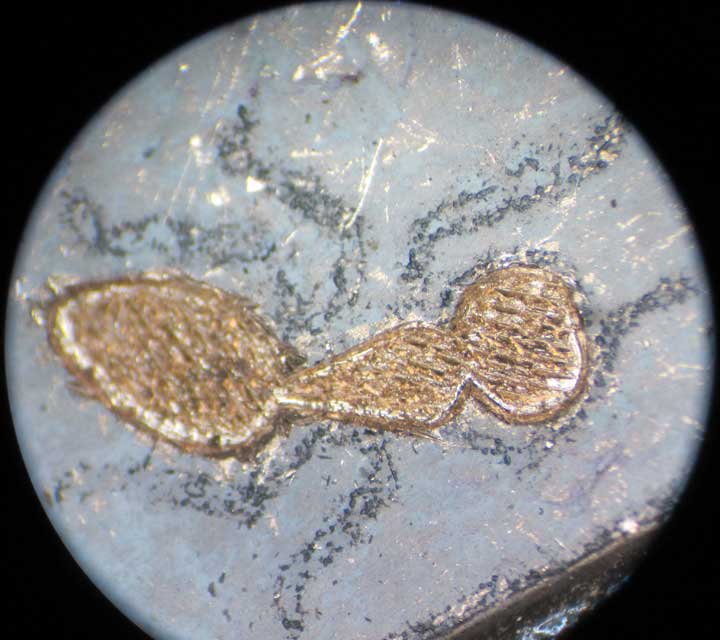
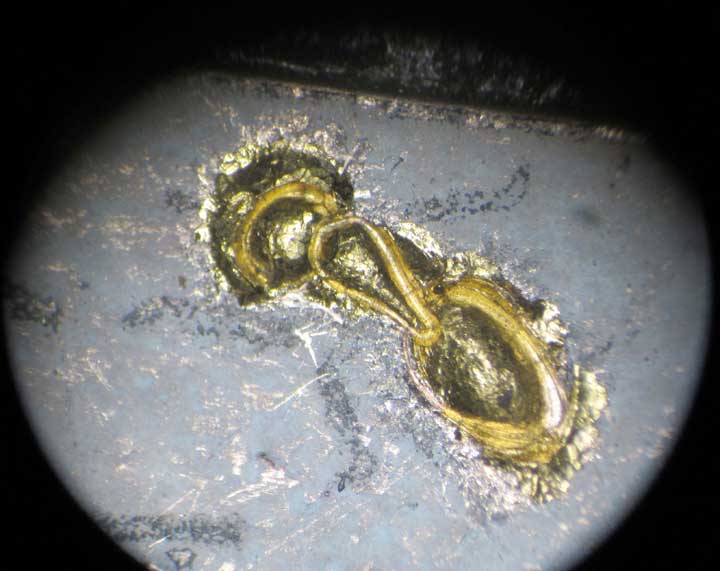
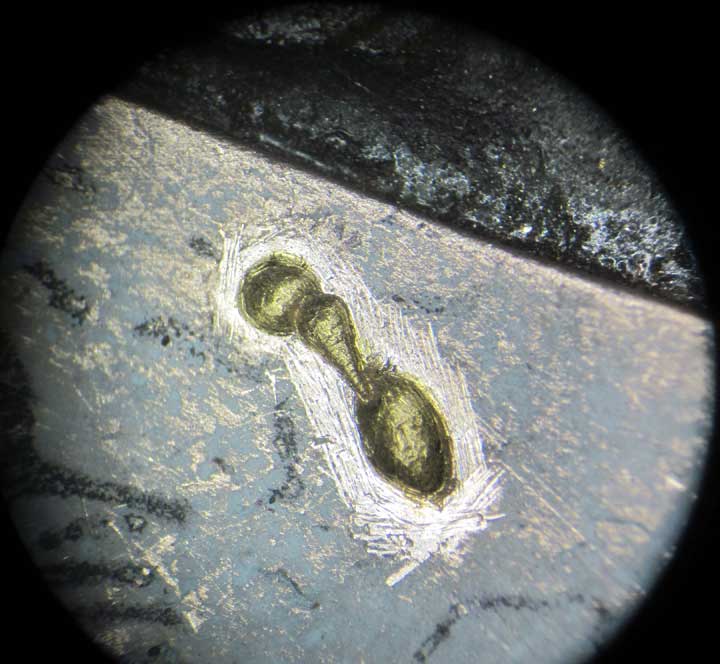
I begin by using my three ant punches to mark where the ant will go, just by hammering the punches lightly into the surface (I wouldn’t do this if the surface was steel, which would probably ruin my punches!).  I use the punches for the marking so the gold inlay cavities will match at the end when I shape the ant with the punches.  This is out of the order I would normally carve this pendant in, because we’re doing this for risk reduction.  Normally, I would do the majority of the carving first, then inlay the gold ant.  Since I’m not certain this will work in the shibuichi, I don’t want to do all that work only to find out the inlay won’t work, so I’m going to reverse the order.  On the right is an image taken through my microscope of the marks left by the ant punches.  From here on, I’ll be showing a lot of images through the microscope, so I apologize for the lousy photos – I’m having to hand hold my camera and finagle things to get these images.


Here. I’ve begun engraving with my Lindsay Palm Control Airgraver inside the punch marks, using a Lindsay Universal 90 degree graver.  I’m intending to excavate inside the punch marks to create a cavity or pocket for the gold inlay.


Above, I’ve finished the outlines, about a millimeter deep, by going over the cuts several times.


Above, I cut a number of parallel lines inside the cavity, removing more shibuichi.

And, here more lines cut at right angles to the first set.


Now to remove the little mountains in between the cuts.  I’ll be using some really small carbide burrs for this.  You can see them in this image.  The top burr is a fresh, new 1/4 round ball burr from Lasco Diamonds, and the bottom one is an old, dull carbide burr, modified by cutting four flat facets in a square pattern on it with my diamond hone.  This is a really great trick to re-purpose dull burrs, and actually seems to improve their cutting action, as well as making them much smaller than you can buy them!  I’ll use the new burr to deepen the inlay pockets and remove shibuichi from the center area, and the smaller one for shaping the bottom corners.


Above, I’ve excavated the pockets.  If you look closely, you can see a little bit of shibuichi fuzz and crud on the top edges of the pocket.  Shibuichi carves very nicely, but the burrs always leave a little bit of material behind, where the shibuichi sort of “smears” a little.  Copper does this even worse.


To get rid of that crud/fuzz, I’m using a small Carl Bleile style scraper, lightly cleaning up the top edges.  You can see more information on this scraper and the really marvelous sharpening fixture here:   http://www.airgraver.com/sharpening.htm


Now that the pocket is completed, I need to address how the gold will be forced into the pocket and be trapped in a manner that it can’t fall out.   I begin by using a small cutting tool, as taught to me by by Ray Cover.  It is a simply a small, symmetrically sharpened chisel, almost like a sharpened flat blade screwdriver.  I use it to cut a series of parallel lines along the length of the pockets.

Then, using the same little chisel, I put in another set of parallel lines at about a 30 degree angle to the first set, and then another set at about 30 degrees to the second set.  This has the effect of making rows of little teeth in the bottom of the inlay pocket, and when the soft gold is driven down into this little forest of teeth, it will stick!

It’s difficult to see in the image above, but I also used the little chisel to undercut the sides, holding the chisel at about a 45 degree angle and driving it into the bottom corners of the pockets.  This raises the surface of the shibuichi up, leaving a gap underneath.  The soft 24karat gold will flow into this “cavern” and be trapped.  If this all works out, the gold will be permanently installed, and the entire pendant would have to be destroyed to remove it.


Now, what you’ve been waiting for, I begin adding the gold.  On the left, I’ve taken a small piece of 18 gauge 24karat gold wire and carefully folded it twice to fit the ant’s abdomen pocket.  After annealing the wire, I used a brass punch and an engraving hammer to tap the gold roughly into place (center image).  My methods must have worked, because the gold stuck after the first tap!  In the image on the right, I began using a smaller brass punch in my airgraver to begin shaping the gold mass, driving it even further into the teeth and undercuts of the pocket.


Here’s the little brass punch (made from 3/16 inch diameter brass rod) and my little engraving hammer I used to seat the gold in the pocket.


Above is the first bit of gold just after a few taps to seat the gold.


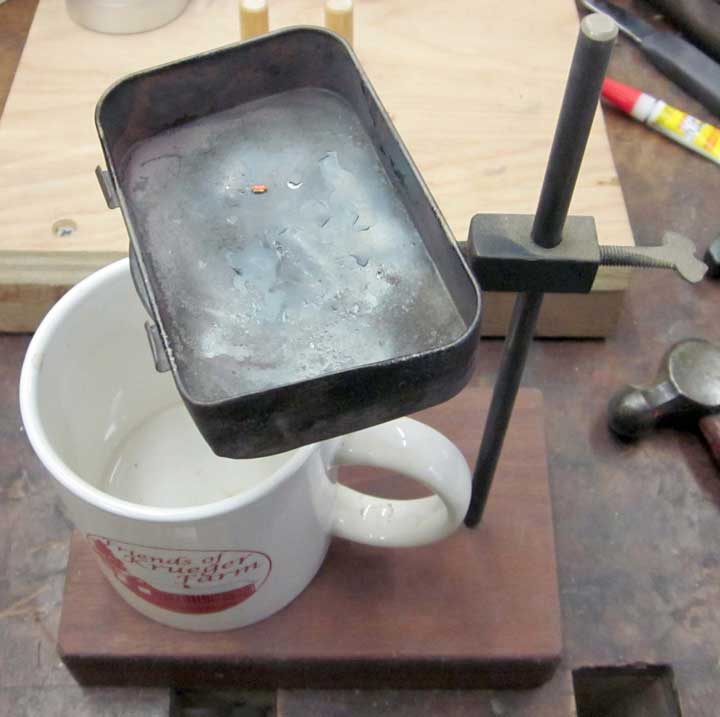
Above is my annealing setup.  A small ring supports an Altoids can, that keeps the direct flame off of the tiny bit of gold, so I don’t melt it into a blob.  Underneath is an old coffee cup with a little alcohol in it.  I’ll quench the hot gold in the alcohol, which will instantly remove any firescale from annealing.  Of course, I’m using alcohol near an open flame and really hot metal, so I have a lid nearby to cover the coffee cup with and smother any flames that might occur!  No problems so far, knock on wood….


Annealing the gold will make it maximally soft, so it will flow well into the pocket undercut and teeth.  Here’s a little trick I learned from Ford Hallam about annealing gold and silver without melting it into a blob – you can see that my little twist of gold looks red – I colored it with a Sharpie™ marker.  I heat the piece from below with a small torch, and when the Sharpie™ color disappears, the gold is annealed!  Then, into the alcohol while still hot.  The little “scream” from the metal means the scale is gone.


Above, the center section of the ant in process.  I used a standard graver to push up the part of the ant’s gold abdomen where the center section will connect, leaving kind of an undercut for the second piece of gold wire to fit into.  On the left, I folded a small piece of wire, using my pliers to squeeze and manipulate the wire until it fit inside the pocket.  Then, anneal the wire, and tap it into place with my engraver’s hammer and brass punch (center image).  Then, in the right image, shaping with the smaller brass punch in the airgraver.  Last, using a standard graver, push up the front end to make an undercut for the head gold to fit into.

One nice thing about 24karat gold, it readily cold-welds to other 24karat gold.  Dental fillings used to be done this way.  Dentists cut a small undercut pocket in a tooth, and using small bits of gold foil and punches, would repeatedly hammer layers of gold into the pocket until it was filled.  The bits of gold would cold-weld to each other, making a solid gold mass.


And, repeat again for the head.  Bend/fit, anneal, seat the gold, shape with small punch.

Above, I continued shaping with a small steel punch in my airgraver.  You can see the punch on the right side of this image.  I made this punch from an old carbide burr by breaking off the carbide part, and shaping the steel into a low dome.


Here, the ant has been shaped with the small steel punch.  I used it to also punch around the bottom edges – this tends to turn any gold that has flowed over the top of the shibuichi into gold leaf, which you can easily brush away, further shaping the ant.


Now is where the ant punches come back into play.  I used them, along with a small hammer, to punch and shape the three parts of the ant, making sure I got the punch to go below the surface of the shibuichi.  Since the gold overlaps the surface a little, I lined it all up as best I could.


Above, I used a standard graver to trim any excess gold from around the edges of the cuts left by the ant punches.


Using the small steel punch, I’ve punched the surface of the shibuichi all around the ant.  If you recall, when we undercut the edges of the inlay pockets, we caused the edges of the shibuichi surface to raise up, now I punched that raised surface down, further trapping the soft gold.  This surface punching also causes any overlying gold to be pounded into thin gold leaf – you can see some at the front of the ant’s head.  This thin leaf can be easily scraped away.  I also shaped the body of the ant using the same punch and really light strikes with the airgraver.


Here, I’ve used the small Carl Bleile scraper to trim the shibuichi surface flush around the outside of the ant.

Above, I’ve used a 90 degree graver to engrave a tiny line around the edges of the ant.  This will provide a good, definite dividing line, visually separating the gold ant from the shibuichi ground.


Here is an image of the small brass punch I’ve been using in the airgraver, and the small steel punch.  The brass punch is made from 1/8 inch diameter brass rod, and the steel punch is from an old carbide burr.  The small socket I turned on my lathe, and the 1/8 inch diameter tenon (on the right side) fits the airgraver better than the 3/32 inch diameter of the punch.  A small setscrew finishes it all off.


And here’s the finished ant body, with my index finger for scale.  I added a quick bit of dark patina around the ant, just to see what is will look like finished.  Next, I have to inlay the little gold legs.  I’m tired now – legs will have to come later.
Posted in Jewelry, Misericordia | Tagged , , , , , , , , | Leave a comment

Ants Miseretto part 9 – Risk Reduction

Now that my “canvas” is completed, it’s time to turn my efforts to the design phase of the project.  I’ve spent an awful lot of time making the knife, and I’m concerned about inlaying the gold ants in the shibuichi.  I’ve inlaid one in nickel before, but not shibuichi, so, in keeping with my policy of “graceful degradation” I’m going to employ a little risk reduction strategy.  In short, I’m going to practice with the offcut leftover piece of shibuichi from the handle scales, and rather than just doing a practice plate, I’ll take a small risk with my time and make a pendant with an inlaid 24karat gold ant.


Above is the process I often use in designing my artwork.
1) On the left, I start with a scan of the leftover shibuichi offcut.
2) Next, tracing the edges, I print out the outline and sketch in the design, scanning it in again.
3) Using Adobe Photoshop, I “cut out” the pieces and arrange them on the screen, then add/subtract/adjust as required.
4) Finally, I produce a full scale pattern (the image on the right), and print it out.


Above is that paper pattern rubber cemented onto the shibuichi.  Did I mention that this piece of shibuichi is a little more than an inch on a side?


While everything is still in a convenient size and easily handled, I drill the holes I will need.


Here, I’ve begun sawing out the two pieces with a jeweler’s saw and tiny 2/0 blade.  I employ a little strategy here, by cutting out the small pieces around the edges first, and have partially cut the top portion away.  I do it this way trying to keep everything together as long as I can to avoid handling tiny pieces.  They tend to fly away and land in the nearest pile of sawdust or other assorted crud…no reason to make this harder than it needs to be!


Note here I cut away the tiny and convoluted top piece first.  The larger piece is still fairly easy to handle, but if there were other chunks needing to be removed from the small piece, it would be difficult to handle.


And, above, all the pieces have been cut away, along with my jeweler’s saw.  These tiny blades are amazing, they seem to be able to cut just about anything!


Above are the sawn pieces.  Note the edges are still pretty rough.  I’ll be filing with jeweler’s files to clean up everything,  as well as also using my NSK micromotor grinder and carbide burrs.  Whatever it takes…


Here is the pendant all cleaned and trimmed up.  Since shibuichi is a copper/silver alloy, being against someone’s skin will cause the metal to corrode.  To prevent that, I’m going to solder a silver sheet on the back.  Here I’ve marked the general outline of the pendant on a piece of 28 gauge silver sheet, and will cut it out with some metal shears.


Ov course, when I cut the silver sheet with the metal shears, it will deform the metal, bending it as I cut.  Above, I’m flattening the cut bit of sheet between two thick aluminum blocks in my big blacksmith’s vise.  Just one big squeeze will do the trick!


Above, I’ve spread a silver-bearing easy solder paste onto the silver sheet and two shibuichi pieces, lying on a heat-resistant soldering pad.  I previously cleaned all three surfaces VERY well with my Foredom flex shaft grinder and a ScotchBrite™ pad.


Here I’m getting ready to melt the solder.  Note my two little soldering helpers holding the shibuichi pieces in close contact with the silver sheet on the bottom.  These things are really marvelous for soldering.


These little helpers are really simple.  Nothing but two pieces of wood, and two thick, bent copper wires filed to a not-very-sharp point, with lead blocks to provide variable amounts of weight.


And above, the first image is before melting the solder, and the second image is after.  I heat the piece slowly, waiting for the water in the paste solder to boil SLOWLY and GENTLY away.  Heating it too fast will cause the water to boil too violently, moving the pieces out of alignment.  Once the water is gone, I heat faster until the solder flashes to molten silver around ALL the edges.


After soldering, I wait unto the solder solidifies (usually just a few seconds), then into the Sparex pickle to dissolve the dark oxide crust that heating produces.  I keep my Sparex hot in a small crockpot from the thrift store.


Here is the pendant after pickling and cleaning a bit with the ScotchBrite™ pad.


Here is the pendant after sawing around the shibuichi with the jeweler’s saw, then cleaned up with files and the Foredom ScotchBrite™ pad.  The silver back is the image on the left, and the shibuichi side on the right. Since the silver is just 28 gauge sheet, the sawing and filing go pretty fast.

Posted in Carving, Engraved Knife, Jewelry, Misericordia | Tagged , , , , , , , , | 2 Comments

Ants Miseretto part 8

Finally!  Today I finished the canvas!


Above, I took corners off of the shibuichi scales, using my belt grinder.


Then, I started draw filing the edges, working them down even with the steel edges of the blade.


Here you can see I’m starting to get the shibuichi scales even with the steel.  I’m actually cutting into the steel a little to make everything flush – you can see where a little of the dark blued steel still remains.


Above, I’ve rotated the knife so the scale is oriented to the top.  If you will recall, we tapered the scales, both front and back, now we need to fair those angular cuts, making a smooth transition from the sides to the flat top.


Here, I’ve begun to do that, by draw filing with my favorite fine cut, almost worn out file.  You can see my progress where the Sharpie marker has been cut away.


And here I’m almost done, just a few areas needing a little work.


Above, I’ve faired the scales, and also smoothed them with a ScotchBrite™ pad in my Foredom flex shaft grinder.  I need to add “scribble” texture to the steel areas in front and behind the shibuichi scales.


And here, I’ve added the texture, blued the steel, and lightly patinated the shibuichi scales.  The canvas is now finished, ready to add the ants and other embellishments.  I also have to finalize the design that has been floating around in my mind.  This is where the hard part begins…
Posted in Engraved Knife, Misericordia | Tagged , , , , | Leave a comment

Ants Miseretto part 7


Today I worked on getting the shibuichi handle scales installed.  Above, I’ve cut the two scales out from the shibuichi sheet.  You can still see the paper pattern rubber-cemented onto one of the scales.


Above, I’m temporarily super gluing one of the scales to the knife handle so I can use the holes already drilled in the knife handle to guide the drill bit for drilling the matching pin holes in the shibuichi.  The super glue will help keep the shibuichi scale from moving during drilling.


Here I’m using a number 46 drill bit to drill a pin hole for my 12 gauge (.080 inch diameter) Argentium™ silver wire pins.  I have a sacrificial piece of 12 gauge copper wire to temporarily install in the hole after I drill it.  This will also help keep the shibuichi from moving during drilling the second pin hole.  Do you notice how much trouble I’m taking to make sure all the pin holes in the three parts line up?


And here I am drilling the second hole with the temporary pin in place.  Note that I have the blade edges and the sharp tip covered in duct tape, just in case.  SAFETY, SAFETY, SAFETY!  The drill press could easily grab during drilling, causing the knife to spin very fast – a tragedy if your fingers are not protected!  I’ll repeat this operation for the other shibuichi handle scale.


Above, notice how the ends of the scales on the left don’t match.  I temporarily super glued the two scales together and installed temporary pins so I could use my disk sander to trim the ends flush.  I’m doing this now because it will be difficult to adjust those areas later when the scales are installed permanently.  I’m not worrying yet about the sides, I can trim those after final installation.


I trimmed up the other end with my NSK micromotor grinder, carbide burrs and a round file (shown above).  I also used my Foredom flex shaft grinder and a ScotchBrite™ pad to smooth both ends, since it will be difficult to do this once the scales are installed.


Here are the finished ends.


I also took this opportunity to do a preliminary taper on the top and bottoms of the scales with a belt grinder, still not worrying about the sides.


Time to epoxy and peen the scales into the place.  Above are the items I’ll need for that.  Note the two little Argentium™ silver wire pins next to the knife handle.  I’ve also cleaned every surface to be glued very well, degreasing with lacquer thinner.  From this point on, I don’t want to touch anyplace to receive glue with my skin, which might leave skin oils behind and make a lousy glue joint.


The two images above are me peening the silver pins in place.  I’ve already spread epoxy glue on all surfaces, and now I’m using my favorite little ball peen hammer to mushroom the soft silver pins over.  This will make the shibuichi scales captive, backed up by the epoxy glue joint.


Here are those rivets.  Something I didn’t tell you earlier, after drilling the pin holes in the shibuichi scales, I went back and partially enlarged the holes (using a number 48 drill), but not drilling all the way through.  When I peened the pins in place, some of the silver mushroomed into the larger extra drilled areas, so even if I file away the top mushroom of the pin, the scale will still be held securely captive.


And, if I haven’t been paranoid enough for you, I’m also using a clamp to make sure the center area of the scales fits well too!  Now to let the epoxy set up for at least 12 hours before touching it…

Posted in Engraved Knife, Misericordia | Tagged , , , , | Leave a comment

Ants Miseretto part 5


Not much happening here, but the blade has soaked in vinegar all night to dissolve the scale created during the blade forging and hot rolling during the creation of the original steel bar.


And, above, the blade after using a ScotchBrite™ abrasive pad to remove the dark oxide left from the vinegar soak.  Nice and shiny steel.  Note the texture left by the etching action of the vinegar on the cutting part of the blade (the top section of the image).  I rather like this, so I think I will leave the steel this way instead of using increasingly fine grits of sandpaper to smooth and polish the surface.


And, here is the blade after cold bluing and burnishing with extra-fine steel wool.  Ready to cut and fit the shibuichi handle scales now.  Still a long ways to go yet.  Did I mention this is a pretty major project, and quite cutting edge for my skills…?

Posted in Engraved Knife, Misericordia | Tagged , , , , | Leave a comment

Ants Miseretto part 4


OK, back to work – I’ve decided the area between the blue arrows (above) needs something to formalize the transition between the handle and the blade.

I’ll address the area by using a small sanding drum in my Foredom flex shaft grinder and add a waist on the top and bottom, then texture the entire area, top, bottom and sides.


In the first image above, I’ve marked where I’m gong to engrave lines to mark a smooth demarcation between the textured area and the smooth part of the blade.  Below that I have engraved the lines, and the bottom is just an enlargement of the cuts.  I will cut away half of those lines, leaving the edges to the left untouched (I hope…).


Above is the knife in my engraver’s vise with my Lindsay Palm Control Airgraver I used for engraving the lines.


Here I’ve begun carving away the surface at the blue arrow (leaving the blade-side half of the line untouched).  I’m using my NSK micromotor grinder and the large carbide burr you see to the right.


Above, I’ve begun making my “scribble” texture.  I start by outlining the edges and corners (leaving half of the engraved lines intact) with a scribbled texture using the smallest of the three burrs I’ve been using for the carving.  Then I gradually fill the interior with the scribbled texture.  In this image, I’ve completed the area at the top, as well as all of the outlines.


Here are all of the surfaces with their completed scribble textures, including the sides of the waist.  I also engraved my signature in a small reserve on one side.  I have to add my signature now before heat treating the blade, because this area will be far too hard to engrave after the blade is hardened.

Above, I’ve cold blued the blade prior to heat treating, mainly to see what it will look like when finished.

I’ll also add a coating of boric acid to the areas to be hardened to keep oxygen away from the steel while heating the blade prior to hardening.  The boric acid will melt and form a kind of glass covering.  Oxygen at those high temperatures (we’re talking glowing hot!) will burn carbon out of the blade, called decarburation, and reduce the ability to harden the steel, especially in the thin areas like the cutting edges.

Posted in Engraved Knife, Misericordia | Tagged , , , , | Leave a comment

Ants Miseretto part 3

Continuing on with the miseretto by grinding and filing.


Above, I have begun grinding the flats on the blade.  It will be a thick diamond cross section, since the misericordia and stilettos were originally designed as a stabbing weapons rather than a cutting-type of knives.  I’m just going to establish the basic shape with the belt grinder, and then refine the shape more gently with files.  This works best for me, since my grinding skills are limited, and my favorite 36 grit belt makes for quick work, but it will ruin the shape just as quickly…

Above, with the magic of computer image editing and after the rough grinding the blade diamond cross section, are two views of the miseretto, one with the pattern rubber cemented on.  Right now, it looks more like a screwdriver rather than a sleek, graceful dagger…

Here, I’ve taken the miseretto to the angle grinder, and carefully roughed in the blade profile.  Finally it’s starting to look like a dagger!


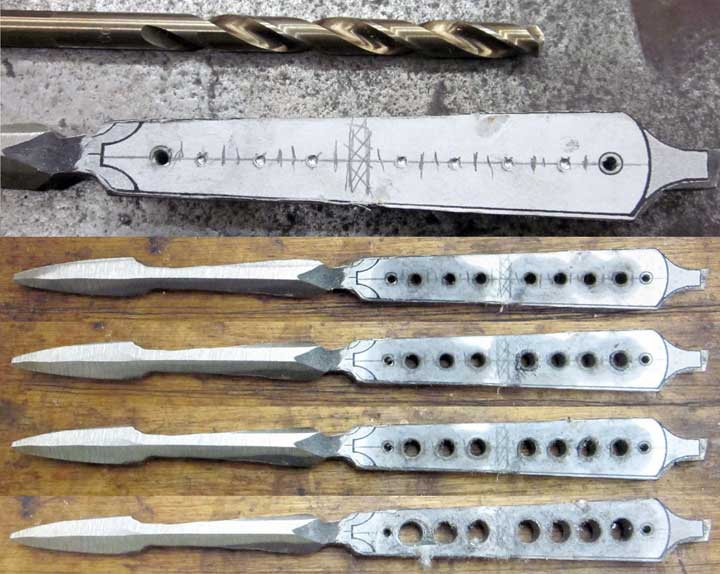
The steel I’m using is pretty thick (3/16 of an inch), and since I’m also going to add shibuichi scales, this will end up a pretty beefy dagger.  I’ll attenuate this problem a bit by removing metal from the inside of the handle.  I begin by carving a dimple where I want each hole – I prefer to carve these with a small carbide burr, rather than using a center punch.  Then, on to drilling holes – but, since this is a high carbon steel, I can’t just grab a drill bit and begin drilling.  This steel will work harden quite easily, and if I start with a 1/4 inch drill bit, I can probably make it about halfway through the steel thickness before the drill bit will locally harden the metal, stall, overheat, and dull itself into complete uselessness.  So, instead, I’ll “sneak up” on it.  I start with a 1/8 inch diameter drill bit – this size seems to drill through most anything.  Once the 1/8 inch holes are done, I’ll re-drill then with a bit 1/16 inch larger, and keep switching up to larger bits until I reach the target size, in the case, 1/4 inch diameter.  Above, you can see the step by step results.

I can remove a little more weight by cutting out the web in between the holes with a jeweler’s saw, so I carved locating dimples and drilled extra holes to shorten the path the saw has to take.  I won’t saw the web out yet – I try to operate in what I call “graceful degradation mode.”  This is a risk-reduction strategy I’ve used most of my life, and it works out really well for me.  Since I still need to refine the shape of the blade, a critical part of the operation that I can still screw up, I’ll wait on the sawing effort until I’m sure the blade is going to be successful.  I drilled the holes before the blade became sharp, however, since should there be a mishap during drilling, a sharp, whirling blade is more dangerous than a whirling dull one…risk reduction in action.

Above, after the first round of draw filing with a coarse file.  I’ll do all four sides, then switch to finer cut files.


After several rounds of careful draw filing with a medium cut bastard file.


Above are top, bottom and side views of the blade finished with a worn out fine cut file

And here, after cutting out the webs with the jeweler’s saw.  At this point, I’ll probably live with the blade for a day or two, thinking my options before making the decisions I have yet to make…

Posted in Engraved Knife, Misericordia | Tagged , , , , , | Leave a comment

Ants Miseretto part 2

Today I’m forging the miseretto blade.  I started by upsetting the blade from the sides, in order to thicken it up a bit.


Above, I’m just beginning the process.  If you look closely, you might be able to make out how the center of the blade looks a little lower than the edges – the metal is beginning to mushroom a little as I drive the mass of the steel towards the center of the blade.  I repeat the process of heat and beat multiple times until the blade is thick enough, hammering both from the edges, top and bottom, and “on the diamond.”  Forging “on the diamond” (from the corners) will forming the diamond cross section of the blade, and also begin tapering the blade towards the tip.  Tapering it will also lengthen the blade, so I’ll have to cut off some eventually.

Here’s the miseretto in the forge heating back up to forging temperature.  It’s really HOT in there.


Above I’ve finished the forging, and carefully made sure everything is straight.  In this image I’m “normalizing” the dagger.  Normalizing is heating the steel up to its critical temperature ( a light orange, in the case of this 1080 carbon steel) and letting it air cool back to “black heat.”  This process will relieve the stresses I put into the steel by whacking it during forging, and also refine the grain size.  I’ll repeat this heat/air cool cycle three times.


And, above, are top and side views of the miseretto after forging and normalizing, ready to begin grinding and filing.

Posted in Engraved Knife, Misericordia | Tagged , , , , | Leave a comment